Beoremote One + Home Assistant
Turn your Bang & Olufsen remote into a native controller for your entire Home Assistant setup.
Out of the box, the Beoremote One only talks to Bang & Olufsen products. There are three ways to bring it into Home Assistant: the free official integration, a bridge you build yourself, or a plug-and-play box. This guide covers each.
Option 1: The official Bang & Olufsen integration (free)
If you already own a recent B&O streaming speaker, this is the cheapest route and it needs no extra hardware. The official Bang & Olufsen integration ships with Home Assistant and is also available through HACS. Pair the Beoremote One with your speaker, add the integration, and each compatible button in the remote's Control and Light submenus appears as an event entity. The entities are disabled by default, so you enable the ones you want, then trigger automations from short, long, and very-long presses.
It has one requirement: the remote's events are routed through a paired "Mozart" product launched after 2020, such as a Beoconnect Core, Beolab 8 or 28, or a Beosound A5, A9 (5th gen), Balance, Level, or Theatre. If you have one of these, start here. If you do not, the integration cannot see your remote, which is where the next options come in.
Option 2: Older Masterlink or Beolink systems
If your B&O system predates the streaming era, the community mlgw project bridges a Masterlink Gateway or Beolink Gateway into Home Assistant. It is more involved to set up and depends on having the gateway hardware, but it is a well-trodden path for classic installations. The BeoWorld forum is the best place to compare notes with other owners.
Option 3: Roll your own over Bluetooth
The Beoremote One BT pairs over Bluetooth, so in principle you can build your own bridge. A small always-on computer, such as a Raspberry Pi, pairs with the remote, listens for button events, and republishes them to Home Assistant over MQTT. This is the most flexible route and needs no B&O speaker at all. The trade-off is that you handle the BLE pairing and protocol yourself and keep the service running and updated. A good option if you enjoy the tinkering.
Option 4: A plug-and-play bridge (Lydbro One)
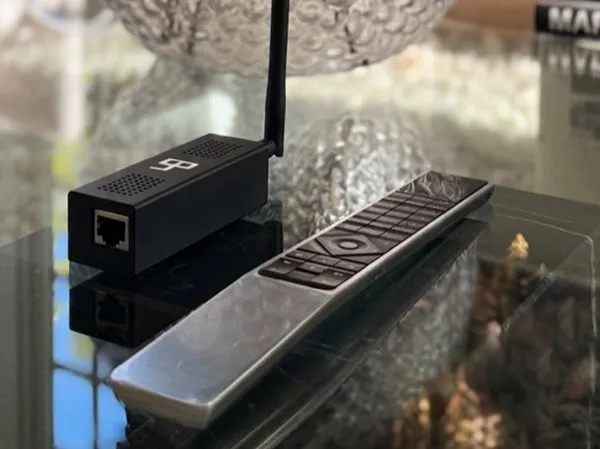
If you would rather skip the DIY work, or you do not own a compatible modern speaker, Lydbro One is a dedicated bridge that handles Option 3 for you. It pairs directly with the Beoremote One over Bluetooth, with no B&O speaker required, and connects to your network over wired Ethernet (PoE or USB powered). It exposes every button and scene to Home Assistant through a native, local integration, installable via HACS. MQTT and webhooks are available for other systems like Control4 and Crestron. Everything runs locally, it is configured from a built-in web UI, and firmware arrives over the air. It is the no-fuss version of building your own.
What you can control
However you connect it, once the remote's presses reach Home Assistant they become events you can map to anything Home Assistant can reach:
- Lights, scenes, and dimmers across any brand
- Media players: Sonos, BluOS, Chromecast, AirPlay, and more
- Your TV, including Samsung and LG, plus Apple TV and Plex
- Climate, blinds, and other smart home devices
- Any automation or script you have already built
Which option is right for you?
- You own a post-2020 B&O streaming speaker and just want HA events: use the official integration. It is free.
- You have a classic Masterlink or Beolink system: look at the mlgw project.
- You are comfortable with a Raspberry Pi and BLE tinkering: build your own bridge.
- You want it to just work, or you have no compatible speaker: Lydbro One.
References & further reading
- Bang & Olufsen integration (Home Assistant docs)
- bang-olufsen/bang_olufsen-hacs (official HACS repository)
- giachello/mlgw (Masterlink / Beolink Gateway integration)
- BeoWorld forum discussion
Related guides
Beoremote One + Sonos
Beoremote One + Bluesound (BluOS)
Beoremote One + Samsung TV
Beoremote One + LG TV
Frequently asked questions
About Lydbro
We are an independent company and are not affiliated with, endorsed by, or connected to Bang & Olufsen. All product names, trademarks, and registered trademarks are the property of their respective owners.